
How to Use QR Codes
on Brochures
Provide deep dives into your services by linking to digital catalogs or videos.
Educate and share information by using QR Codes on your brochures to create an interactive print and digital literature hub for your clients, customers or patients.
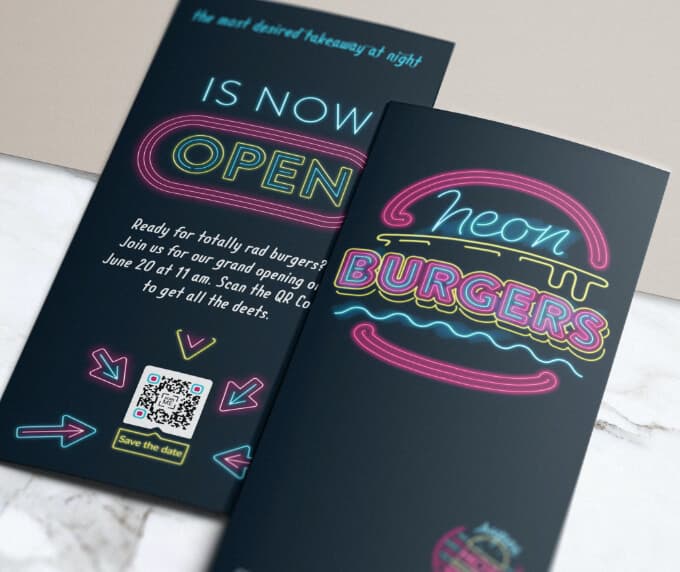
The Benefits of Using QR Codes on Brochures
The QR Code is the perfect tool to improve communication lines between businesses and consumers, teachers and students, or healthcare providers and patients.
By adding QR Codes on brochures, you can now make multimedia content available on print using mobile device readers. You can explore different ways QR Codes can make your organization operate more efficiently by reading further.
1. Inform
If you want your customers or clients to discover more information about the services you offer or a new product your company has just released, boost your print marketing by adding a PDF QR Code that links to customizable, mobile-friendly documents.
Your clients or customers can save these documents to their devices and access them at their own convenience without internet access.
You can also share multimedia content like informative videos by printing a Video QR Code in your tri-fold brochure. With a dynamic QR Code, you can even create a playlist of your YouTube videos.
2. Connect
Bridge the communication gap between you and your consumers, clients, or patients by offering them a direct link to your online platforms by printing a QR Code on your brochures.
Place your brochure in different public spaces and stores with a Social Media QR Code to display all your social media accounts so any prospective customer can follow you.
You can also use a Business Page QR Code to share your opening hours, phone number, email address, or additional website links. With one scan, clients or patients can connect with you instantly.
3. Engage
By using a Feedback QR Code or Rating QR Code, you can improve your services and customer experience by allowing people to provide helpful comments and ratings with just one scan.
If you promote a communication or service app, you can print an App Store QR Code on your brochures so customers can easily download it from the Apple App Store, Google Play Store, or Amazon Appstore.
4. Analyze
QR Code tracking tools allow you to see where, when, and with what device a scan took place. This information helps measure your brochure campaign’s success.
With these insights, you can improve your marketing strategy by changing design elements or distribution points.
For example, if brochures were distributed during a convention, the scan data can show whether your presentation generated strong audience interest.
💡 Pro Tip
Turn Your Brochure into an Interactive Experience
Don’t limit your brochure to printed space. Use your QR Code to unlock videos, catalogs, or detailed guides that bring your content to life. The more value users get after scanning, the more memorable your brand becomes.
How to create a QR Code on a Brochure?
- Go to a QR Code Generator and select the type of QR Code you’d like on your brochure.
- Enter your website address.
- Your QR Code will be generated automatically.
- Customize the design by adding a frame and a “Scan Me” logo.
- Select colors that match your brand identity.
- Download the QR Code file.
- Add the QR Code to your brochure design.
QR Codes on Brochures Best Practices
Running a successful informational campaign with brochures requires capturing your audience’s attention with strong visuals, a clear call-to-action message, and a well-designed QR Code.
1. Add instructions
One common mistake is printing QR Codes without explaining what users will gain from scanning them. Always include a short description to encourage people to scan the code.
2. Frame it
Customizable frames allow your QR Code to match your brochure design or company brand identity.
You can choose different frames, CTA messages, colors, shapes, and icons to personalize the QR Code design.
3. Add a logo inside your QR Code
Adding a logo in the center of your QR Code helps strengthen brand recognition. You can also add custom CTA text such as “Chat now,” “Find out more,” or “Discover.”
4. Save your designs
QR Code design templates can be saved so they can be reused for future marketing campaigns without needing to recreate them from scratch.
5. Test before printing
Before printing brochures, test the QR Code using several scanning apps to ensure it works correctly.
The recommended minimum size for QR Codes on brochures is about 2 × 2 cm to ensure reliable scanning.
See QR Codes on Brochures in Action
QR Codes can enhance brochure campaigns across many industries. Below are a few examples of how organizations can benefit from using them.
Educational Institutions
Schools and universities can add Video QR Codes to brochures to share testimonials from alumni, current students, and teachers introducing their programs.
Home Repair and Maintenance
Service companies can add App Store QR Codes that link to scheduling apps so clients can easily book repair or maintenance services.
Healthcare and Doctors
Healthcare providers can include PDF QR Codes in brochures to offer detailed information about treatments, hygiene practices, or medical procedures.
Restaurants
Restaurants can use Image Gallery QR Codes to display seasonal menus and new dishes without needing to reprint their brochures.
Gym and Wellness Studios
Fitness centers can add MP3 QR Codes linking to podcasts or audio training advice so members can access health tips and workout guidance anytime.
Get Started Free
Ready to make your scan-worthy?
Create a free dynamic QR code in 30 seconds. No account needed to start.